> For the complete documentation index, see [llms.txt](https://uxento.gitbook.io/uxento/llms.txt). Markdown versions of documentation pages are available by appending `.md` to page URLs; this page is available as [Markdown](https://uxento.gitbook.io/uxento/tools/uxtension/settings/highlight-significant-holders.md).
# Highlight Significant Holders
This part of the documentation will show you how to highlight wallet addresses that hold a significant percentage of the token supply.
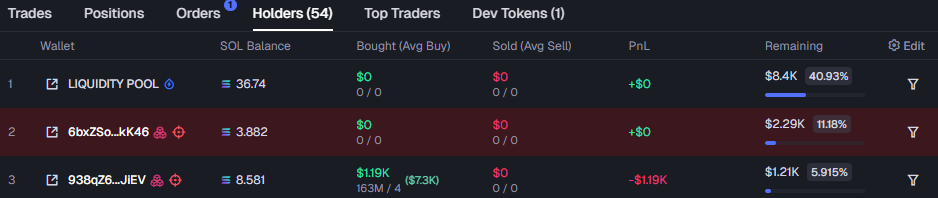
By default using the uxtension with your trading platform will highlight holders who own 5% of token supplies, however, you can adjust the threshold in which this triggers.
To do so, navigate to the **Analysis & Data** panel under your uxtension settings and scroll down to **Highlight Significant Holders,** toggle on the button and adjust the slider to your desired token threshold.
Adjust the Slider to your Preferred Threshold.
Holders with Token Supplies Over the Defined Amount Will Be Highlighted.