> For the complete documentation index, see [llms.txt](https://uxento.gitbook.io/uxento/llms.txt). Markdown versions of documentation pages are available by appending `.md` to page URLs; this page is available as [Markdown](https://uxento.gitbook.io/uxento/portfolio.md).
# Portfolio
This part of the documentation will explain how to use your uxento Portfolio.
**Portfolio** is your wallet management hub where, you can create, import, archive and further manage your wallets across different blockchains. You can access your **Portfolio** via the toolbar at the top left of your home page.
Portfolio Wallet Management Tab
You can also see an overview of your main wallet and its balance at the bottom of the of the page.
Wallet Overview Easily Accessible at the Bottom of your Home Page
## Consolidate Balances:
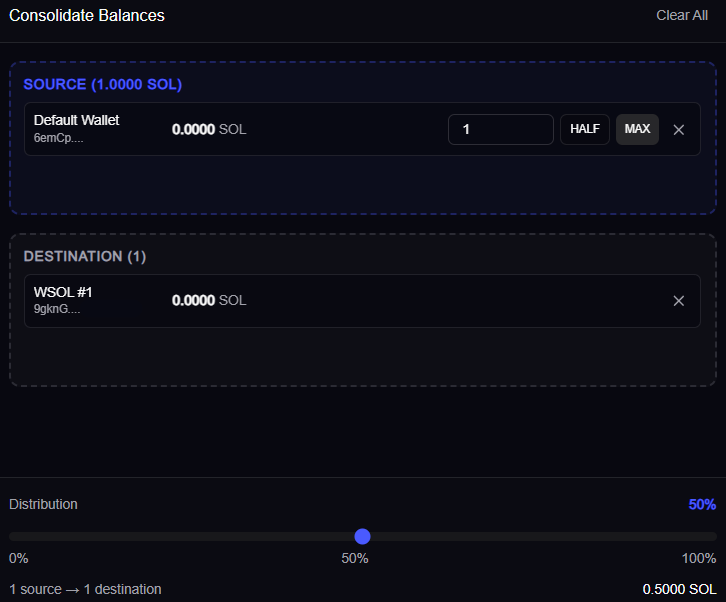
Within your **Wallet Overview** you may consolidate and distribute balances between wallets with ease.
To do so, drag the source wallet, and the destination wallet to the **Consolidation** panel, define the distribution and click **'Review & Start Transfer'** to initiate the consolidation.
## Split Crypto:
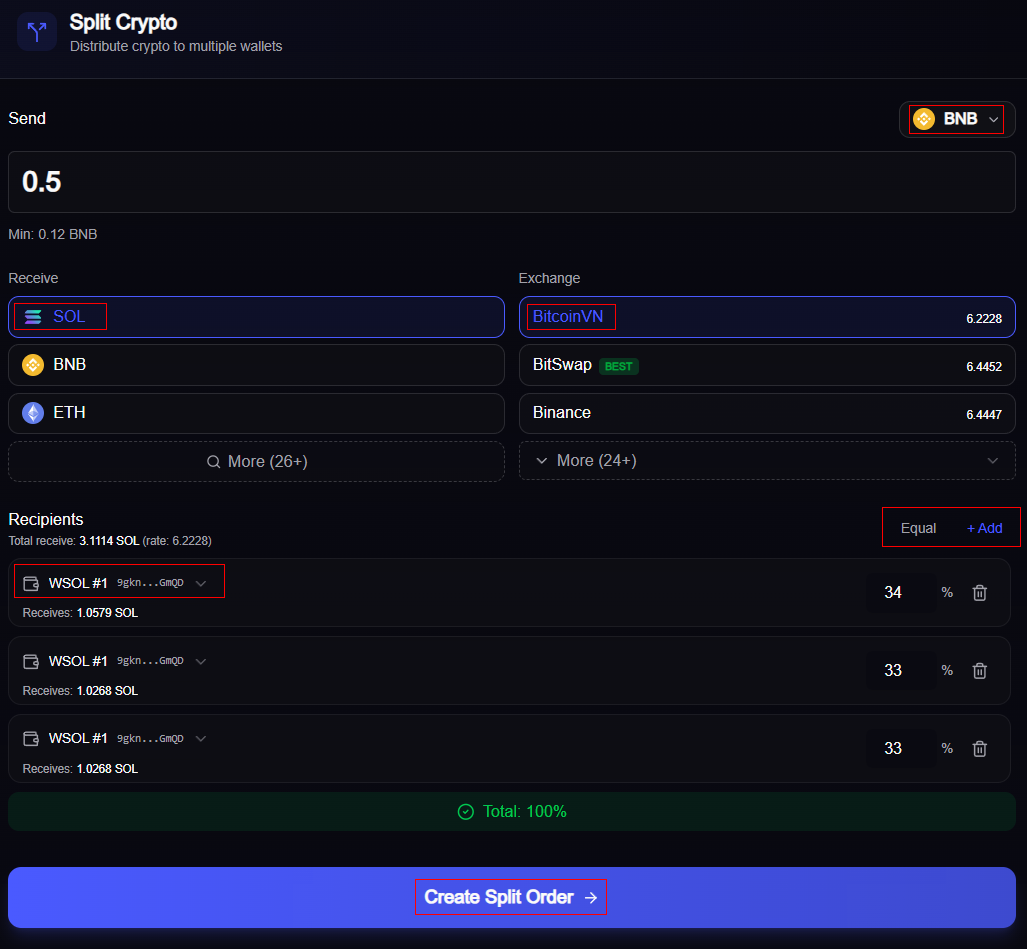
**Split Crypto** allows you to split and fund multiple wallets simultaneously through a wide variety of different currencies and exchanges, powered by SplitNow\.io.\
\
To create a **Split Order**, navigate to the **Split** tab in your Portfolio and specify the source currency and amount, along with the currency you wish to receive. You may choose from **26+ supported currencies** and customize the exchange to achieve optimal rates.
Once configured, add recipient wallets by clicking '*Add*' and then selecting from your imported wallets via the drop down, define the distribution *(or click the handy 'Equal' button)*, and click **Create Split Order** to initiate the exchange and transfers.
Split Balances Panel
{% hint style="info" %}
You may view active and past split orders via the Order Status / Order History tabs within the Split panel.
{% endhint %}
## **Bridge:**
***Powered by Sideshift, bridge assets seamlessly.***
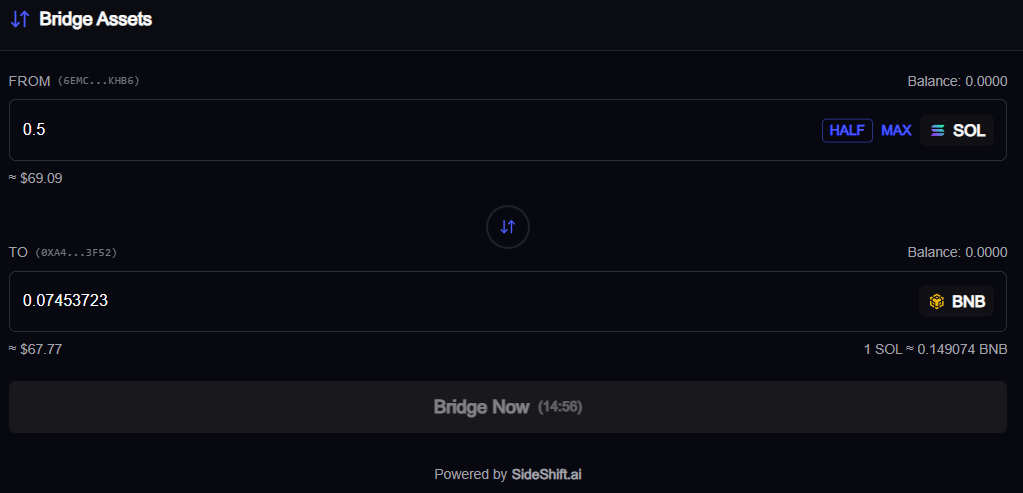
You can use **Bridge** to easily exchange between SOL and BNB. To access **Bridge**, simply click on the '*Bridge'* tab within your **Portfolio**.
To quickly access **Bridge** click the **Arrows** icon in your wallet overview to open the **Bridge** panel.
#### Swap Between SOL/BNB via Bridge:
To swap between currencies, simply input the amount of SOL/BNB you wish to exchange, as well as the wallet you wish to receive your currency into *(by default, Bridge will auto-populate this field with your default wallet on the selected chain),* **Bridge** will receive a real-time quote for your swap which will be active for 15 minutes. To complete the swap, click '**Bridge Now'.**
**Bridge** will automatically use the funds in your attached wallet/s to fund the transfer; Within minutes, your requested currency will arrive in your receiving wallet.
## Delete Wallets:
While you can Archive wallets easily by clicking the '**Archive**' icon in your **Portfolio** overview, to delete them permanently you must access the '**Archived'** tab and click the '**Delete'** icon to remove wallets entirely.
You may also restore archived wallets within this tab by clicking the icon next to any wallet.
To see a live demo of how to set-up and use your uxento Portfolio, you can watch the below video:
{% embed url="" %}